How staged rollouts work on the App Store and Google Play
A staged rollout sends a new version to a few people before everyone. Here is how that works on the App Store and Google Play, what to watch at each step, and what Nalya does while it runs.
Why ship to a few people first
Your test devices are not your users. A new version meets thousands of phone models, OS versions, slow networks and old data the moment it ships. Some bugs only show up there.
So both stores let you release an update in stages. A small share of users gets it first, you watch what happens, and you widen it only when the numbers hold. Google’s reliability engineers call this canarying: a partial, time-limited deployment and its evaluation, starting small “to minimize negative impact”.1 If the build is bad, it hurts 1% of your users instead of all of them.
The two stores do it differently, and the difference decides what you can do when something breaks.
On the App Store: phased release
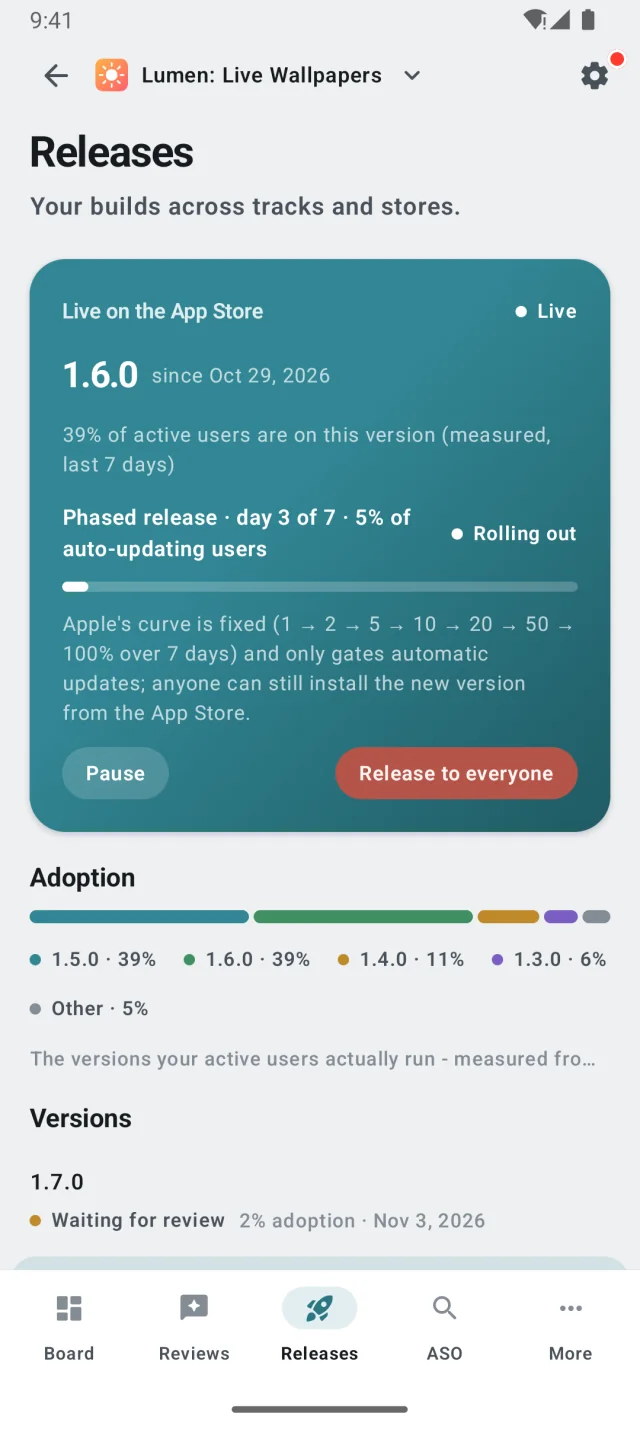
When you release an update on the App Store, you can choose a phased release. Apple then offers it over seven days on a fixed curve, to a random sample of users who have automatic updates on.2 You don’t pick the percentages.
Three details matter more than the curve:
- It only gates automatic updates. Anyone can download the new version from the App Store by hand, at any time.2 So some users run it from day 1, whatever the curve says.
- Pausing is the only brake. You can pause for up to 30 days in total, as often as you like.2 A pause stops automatic updates. It does not take the version off the store.
- You can skip ahead. Once you are confident, you can release to all users at any time.2
On Google Play: staged rollout
Google Play hands you the dial. You choose what percentage of users gets the update, and you raise it yourself. It won’t increase automatically.4 New and existing users are both eligible, chosen at random. Staged rollouts are for updates only, not a first release, and once one starts you can’t remove countries from it.4
Play also has a real stop. Halting a rollout means the update stops reaching new users. Users who already have it stay on that version. If the build turns out fine, you can resume, and the rollout continues to the same set of users.4 If it isn’t fine, you roll out a new release with a fixed build.
The two stores, side by side
| Topic | App Store | Google Play |
|---|---|---|
| How it ramps | A fixed 7-day curve: 1, 2, 5, 10, 20, 50, then 100%. | You set each percentage. It never rises on its own. |
| Who gets it | A random sample of users with automatic updates on. Anyone can still install it by hand. | New and existing users, chosen at random. |
| When it goes wrong | Pause, for up to 30 days in total. The version stays on the store. | Halt. No new devices get it; devices that have it keep it. |
| Shipping the fix | A new build through App Review. Expedited review exists for critical bugs. | A new release with the fixed build, rolled out the same way. |
| Store quality signal | Your own crash reporting. | Android vitals: crash and ANR rates, with published thresholds. |
What to watch at each step
On the App Store, your own crash reporting is the signal to watch. Google Play adds a store-side yardstick, Android vitals, and it is a Play-only signal. Its headline number is the user-perceived crash rate: the share of daily active users who hit at least one crash while actively using your app. Play treats 1.09% across all devices, or 8% on a single phone model, as bad behavior. Above those lines your app is likely to be less discoverable, and a warning may appear on your store listing.5
ANRs count too. An ANR (Application Not Responding) is triggered when, among other things, your app doesn’t respond to a touch or key press within 5 seconds.6 The thresholds are 0.47% overall and 8% per phone model.7
Whichever store you are on, each stage asks a different question:
- The first 1 to 5%. Is anything new? Look for crashes that only exist in the new version. Don’t wait for vitals here: Play shows vitals data only once it has enough to report anonymously, and only from users who agreed to share it.7
- Around 10 to 20%. Is it worse on some devices? The 8% per-model threshold is where one popular phone can sink you while the overall rate looks fine.
- 50% and up. Is it holding at scale? Compare the new version’s crash-free rate with the one it replaces, and read the new reviews.
- After 100%. Keep watching. Play judges your app on the last 28 days, so a bad week stays in the average long after the fix ships.7
An example: version 2.4 on both stores
Say you ship 2.4 on a Monday: a phased release on the App Store and 5% on Google Play.
- Tuesday
A crash shows up that no earlier version has. It is in an image cache you rewrote, and it hits users on both platforms.
- Tuesday, App Store
It is day 2, so the update has gone out to 2% of auto-updating users, plus anyone who installed it by hand. You pause. The version stays on the store, but automatic updates stop.
- Tuesday, Google Play
You halt at 5%. No new devices get
2.4, and the 5% who have it keep it. - Wednesday
You fix it and build
2.4.1. On the App Store you submit it to App Review and ask for an expedited review for a critical bug. On Google Play you roll it out at 5% again. - The following week
The new version’s crash-free rate matches the old one’s, so you let the App Store’s phased release run its course and widen the Google Play rollout step by step.
Without staging, every auto-updating user would have been offered 2.4 on Monday. With it, a few percent got it, and the fix went out the same way.
What Nalya does while a rollout runs
Nalya connects to App Store Connect and the Google Play Console and keeps an eye on every release for you, so you don’t have to keep both consoles open.
- Tells you when anything moves
On the App Store: a version waiting for review, in review, approved and waiting on you, live or rejected. On Google Play: a rollout at a new percentage, fully live, halted or back to draft, and a new build landing on a track.
- Shows who really runs each version
The stores report what they were told to offer. Nalya measures the share of your active users on each version over the last 7 days, from your app’s analytics.
- Ties crashes to the version behind them
Issues marks crashes that are new in your latest version and, from your analytics, puts each version’s crash-free rate side by side. On Google Play it also pulls crash and ANR clusters from Android vitals.
- Puts the next step one tap away
App Store: submit a build to App Review, then pause, resume or release to everyone. Google Play: promote a build up the tracks, widen the rollout or halt it. From the console or the app.
- Finishes the job in the background
Submissions and promotions run as background jobs, so you can close the page. If one fails, the reason stays on the card and reaches your phone as a notification.
Adoption is the number the stores don’t give you. A phased release at day 6 says 50% of auto-updating users were offered the version, not how many run it. Nalya shows the measured share next to every version.
When a crash does show up, Issues puts it at the top with the version it first appeared in, so you can tell a new problem from an old one before you decide on the next step.
You make every call
Nalya does not ramp, pause or halt a rollout on its own. It watches, tells you what changed and shows you the evidence. Every promotion, pause and halt is a button you press, and before a halt the console spells out what it will and won’t do: the version stops reaching new devices, and nothing is rolled back.
Nalya watches every step. You decide the next one.
- Google, Canarying Releases, The Site Reliability Workbook. ↩
- Apple, Release a version update in phases, App Store Connect Help. ↩
- Apple, App Review: at least 50% of submissions reviewed in under 24 hours and 90% in under 48 hours, typically. Expedited review can be requested to fix a critical bug. ↩
- Google, Release app updates with staged rollouts, Play Console Help. ↩
- Android Developers, Crashes in Android vitals. ↩
- Android Developers, ANRs. ↩
- Android Developers, Android vitals: core vitals, bad behavior thresholds, the 28-day window and why vitals can differ from your SDK. ↩