How people find apps in the stores
Most people find an app by typing into a search box. App Store Optimization is how you show up for those searches in every language you sell in, and look worth installing when you do. Here is how it works on the App Store and Google Play, and what Nalya does about it.
Found, then chosen
People reach your listing two ways. They search, typing what they want into the store, or they browse: charts, categories and the suggestions the store puts in front of them. On the App Store, Apple ranks search results on text relevance, meaning your name, subtitle, keywords and primary category, and on user behavior such as downloads, ratings and reviews.1
So ASO has two jobs, and a listing needs both.
- Be found
Show up for the words people actually type, in each language.
- Be chosen
Once your result is on screen, give people a reason to tap it and install.
A listing that ranks but doesn’t convince wastes the ranking. A beautiful one nobody finds wastes the design.
What each store reads
The two stores ask for different fields, and read them differently. The App Store gives you a hidden keyword field. Google Play doesn’t, so on Play the words you want to be found for have to live in text people read.
- Name30Ranks in search
Your brand and your strongest term.
- Subtitle30Ranks in search
Shown under the name everywhere.
- Keywords100Ranks in search, never shown
Comma-separated, no spaces.
- Description4,000For the reader
Not on Apple’s list of ranking inputs.
- Promotional text170For the reader
Doesn’t affect ranking. Editable anytime.
Apple also ranks on your primary category, downloads, ratings and reviews.
- Title30Helps people find you
Your brand and your strongest term.
- Short description80Shown in search results
The first text on your listing.
- Full description4,000For the reader
Everyday language, not a keyword list.
No keyword field: every word you want to be found for lives in text people read.
On the App Store, the name and subtitle are 30 characters each, and the keyword field holds 100 characters, separated by commas with no spaces.2 The description can run to 4,000 characters, but it isn’t among the inputs Apple lists for search: its job is to convince the person reading. Promotional text, up to 170 characters, sits above the description. Apple says it doesn’t affect search ranking, and it’s the one field you can change without submitting a new version of your app.3
On Google Play, the title is 30 characters, the short description 80 and the full description 4,000, and full-width and half-width characters count the same.4 The short description appears in places like search results,5 so it does double duty: the first pitch a person reads, and words the store can match.
Thirty characters go fast
Thirty characters is about four or five words. Most first drafts run long, and the store won’t take the overflow. Cutting at the limit leaves half a phrase. Rewriting keeps the words that matter.
A 50-character draft title, Tideway - Sleep Sounds, White Noise & Rain Machine, is over the 30-character limit. Cut at 30 it reads “Tideway - Sleep Sounds, White”, half a phrase. Rewritten, it reads Tideway: Sleep Sounds & Rain, 28 characters.
On the App Store, the subtitle and the keyword field work as a team with the name. Apple asks you not to repeat words already in your name, subtitle or category,6 because a word counts once. Every character you save buys another term.
Sleep sounds to help you sleep
sleep sounds,
White noise, fan and ocean
brown,
Google Play: written for people
Because Google Play reads the words in your listing, it’s tempting to stuff them. Google’s metadata policy says not to: no repetitive or unrelated keywords, no claims about store performance such as “#1” or “Popular” in the title, icon or developer name, no emojis or repeated special characters there, and no all caps unless it’s your brand.7 Repetitive or irrelevant keywords in the name or descriptions can get an app suspended.8
Best sleep app!!! Sleep sounds, sleep music, sleep, relax, rain, sleep sounds
Fall asleep faster with rain, fan and ocean sounds that play all night offline
Every language is its own listing
Your listing isn’t one page. It’s one page per language. Apple suggests localizing your description, keywords, screenshots and app previews for each market, translating your name, and tailoring your keywords to each one.9 On Google Play, a language you haven’t translated shows an automatic Google Translate version or your default language, and people see localized graphics only when their language matches one you’ve added.10
Good localization isn’t word-for-word. People in each market describe the same need in their own words, and the phrase that wins in one language may be nobody’s search in another.
- de-DESchlafmusiksleep music
- es-MXruido blanco para dormirwhite noise for sleeping
- ja睡眠用BGMbackground music for sleep
- pt-BRsons para dormirsounds for sleeping
- fr-FRmusique pour dormirmusic to sleep to
Pictures do the persuading
Words get you found; images get you chosen. On the App Store you can show up to 10 screenshots and up to three app previews of up to 30 seconds, which autoplay muted. Without a preview, the first one to three screenshots appear right in search results, so they carry the most weight.11
On Google Play you can add up to 8 screenshots per device type, with at least two to publish, plus a 1024 by 500 feature graphic and a 512 by 512 icon.12 Google suggests keeping text on your graphics to a minimum, and giving each language its own screenshots when they carry words.13
Ratings count too
Ratings and reviews appear on your product page and in search results, and Apple says they can influence how your app ranks in App Store search.14 Answering reviews is part of the job, which is why Nalya also drafts a reply to every new review on the App Store and Google Play, for you to approve.
Test, don’t guess
Both stores can test a listing change on real traffic before you commit to it. Apple’s product page optimization tests up to three alternate versions of your icon, screenshots and app previews against the original, for up to 90 days, and any new metadata in a test needs App Review first.15 Google Play’s store listing experiments test up to two variants against your current listing: graphics in your default language, or graphics and descriptions in up to five languages.16
What Nalya does: drafts you approve
Nalya reads your live listing in every language it has on the App Store or Google Play, and drafts rewrites field by field: name or title, subtitle, keywords, descriptions and promotional text, whichever the store has. Every draft fits the store’s character limit and says why: the reasoning, how confident Nalya is, and the keywords the change leans on. Nothing is published until you approve it.
The keywords come from evidence Nalya can check: the words your own reviewers use, the terms several rival titles spend characters on, where your app ranks in store search for the terms it tracks, and on Google Play, what people type into search autocomplete. Nalya keeps those sources apart, because a term rivals compete for is a sign of competition, not proof that anyone searches for it.
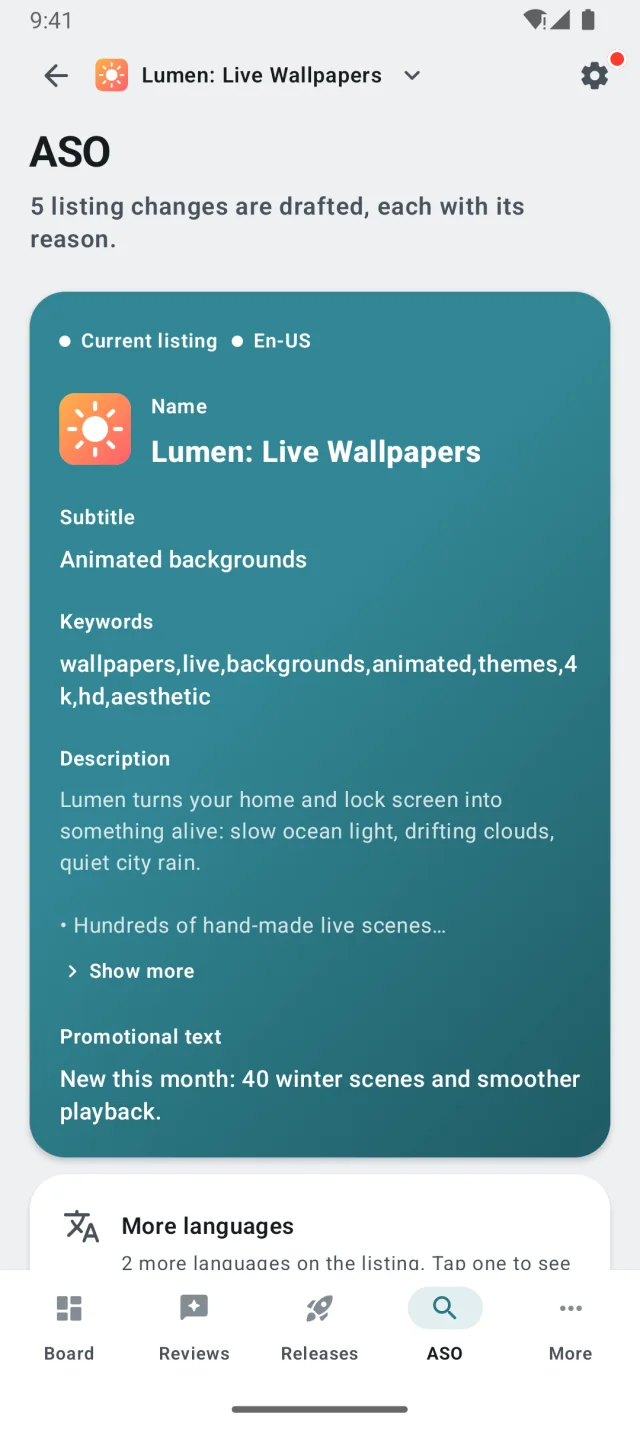
On the App Store, changes ride your next version
Apple lets you change promotional text at any time; the rest of the listing goes live with an app version. So when you approve an App Store change, promotional text goes live right away and every other field is queued. As soon as you create your next version in App Store Connect, Nalya attaches the queued changes to it, and they reach the store with that version.
- You approve
Promotional text goes live now. Every other field is queued.
- Queued
Waiting for a version of your app it can ride on.
- You create a version
In App Store Connect, as you do for any release.
- Attached, then shipped
Nalya attaches the change; it goes live with that version.
Store rankings take time to settle after a listing changes, so Nalya marks the 14 days after each change as settling, and warns you before you stack another change on top. Once you’ve approved 15 ASO changes without edits, you can switch the module to auto.18 Nalya then picks the best draft, gives you 24 hours to block it, and waits at least 14 days between changes, 28 by default.
Languages, graphics and tests
- New languages (Google Play)
Nalya suggests which languages to add next, from where your installs came from over the last 90 days and the languages your reviewers write in. It localizes your title and descriptions into each one for you to review, then publishes the language with its images in one Play edit.
- A critique of your graphics
On both stores, Nalya reviews your icon and leading screenshots, plus the feature graphic on Google Play, and lists what’s missing. On Google Play it drafts the fixes, like a new screenshot order or an empty slot to fill. You upload the images; publishing replaces that slot’s set in one store update.
- Store listing tests
On the App Store, Nalya runs product page optimization tests of your screenshots end to end: it builds the test from your images, sends it to App Review, starts it once approved and promotes the treatment you pick. Google Play has no experiments API, so Nalya packages the variants with the exact Play Console steps, and the winning images publish through Nalya. Tests of the short or full description are Google Play only.
- No invented winners
Neither store reports test results through its API, so you read the verdict in App Store Connect or Play Console, and Nalya never claims a winner for you. While a test runs, Nalya holds changes to the field under test, so the listing stays still.
ASO listing updates are part of Grow and Scale. Graphics, new languages and store listing tests are part of Scale.19
- Apple: search results are based on text relevance (title, subtitle, keywords and primary category) and user behavior (downloads, ratings and reviews, and more). Source: Apple Developer, App Store search. ↩
- App names and subtitles can be up to 30 characters; keywords are limited to 100 characters total, separated by commas with no spaces. Source: Apple Developer, Creating your product page. ↩
- Promotional text is up to 170 characters, can be updated at any time without submitting a new version, and doesn’t affect search ranking. The 4,000-character description limit is from App Store Connect Help, Platform version information. Source: Apple Developer, Creating your product page. ↩
- App name 30 characters, short description 80, full description 4,000; limits apply to both full-width and half-width characters. Source: Play Console Help, Create and set up your app. ↩
- The short description appears in places like search results. Source: Play Console Help, Best practices for your store listing. ↩
- Don’t repeat words included in your app name, subtitle or category. Source: Apple Developer, App Store search. ↩
- Covers repetitive or unrelated keywords, performance and ranking claims, emojis and special characters, and all caps. Source: Play Console Help, Metadata policy. ↩
- Repetitive or irrelevant keyword usage in the app name, short description or full description can result in app suspension. Source: Play Console Help, Create and set up your app. ↩
- On localizing the description, keywords, app previews and screenshots, and translating the app name. Source: Apple Developer, Creating your product page. ↩
- On translations, automated Google Translate versions and localized graphic assets. Source: Play Console Help, Create and set up your app. ↩
- Up to 10 screenshots and up to three app previews of up to 30 seconds; the first one to three screenshots appear in search results when no app preview is available. Source: Apple Developer, Creating your product page. ↩
- Up to 8 screenshots per device type and a minimum of two; feature graphic 1024 by 500 px; icon 512 by 512 px. Source: Play Console Help, Add preview assets. ↩
- Keep text to a minimum; provide separate screenshots for each language you support. Source: Play Console Help, Best practices for your store listing. ↩
- Ratings and reviews appear on your product page and in search results, and can influence how your app ranks. Source: Apple Developer, App Store search. ↩
- Up to three treatments of app icons, screenshots and app previews; a test runs for up to 90 days; new metadata must be approved by App Review. Source: Apple Developer, Product page optimization. ↩
- Up to 2 variants; default graphics experiments, or localized experiments of graphics and descriptions in up to five languages. Source: Play Console Help, Store listing experiments. ↩
- Apple: Custom product pages (up to 70). Google: Custom store listings (up to 50). ↩
- Automation is opt-in per module, and autonomy is part of Grow and Scale. Every automatic change is logged. ↩
- During the open beta, these plan limits aren’t enforced. ↩